Tuesday, August 9, 2022

Load runner to Neoload script converter with a command line tool | LR to Neoload Script Converter

A command-line utility called The Script Converter transforms LoadRunner scripts into NeoLoad projects.

Download the tool from here {Neotys Lab}:

Download Script Converter

Open Command Prompt and enter the following Command:

-source <LR Scripts folder> -target <NeoLoad output directory> -project <NeoLoad Project name

Example: 

Windows: .\script-converter.bat -source "C:\LoadRunnerScripts\TestHome" -target "C:\Users\Documents\NeoLoadProjects\TestHome" -project "TestHome"

Linux/OSX: ./script-converter.sh -source "/home/user/LoadRunnerScripts/TestHome" -target "/home/user/NeoLoadProjects/TestHome" -project "TestHome"

LR Scripts folder - Source directory where all scripts in each sub-directory will be converted into the output Project
NeoLoad output directory - The folder of the created NeoLoad Project
NeoLoad Project name - The name to assign to the NeoLoad project

Saturday, August 6, 2022

How to convert LoadRunner script to NeoLoad project? | NeoLoad Script Converter

I have a Loadrunner script and I would like to convert it to a Neoload Project. There's an easy way to do this automatically.
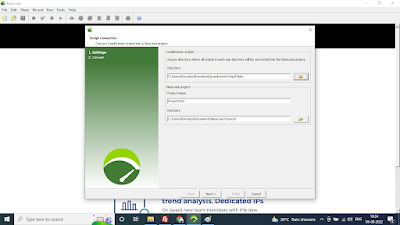
1.First you need to open Neoload tool, then go to Tools and Script Converter 

2. You need to enter load runner script directory or folder(not the Vugen Script location) and give a name to your neoload project and give the directory path where the neoload converted script need to be stored as shown in below.


3.Click on next to initiate the conversion process

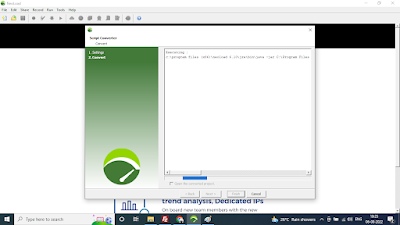
Once the the process is over, It will show you the successful message as highlighted in the below image.

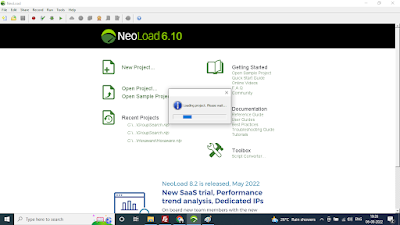
You can see the converted neoload project loading

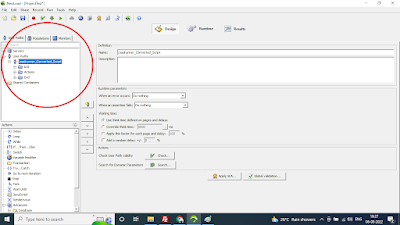
This is the final converted script with all Init, Action and end.

Note: (This converter utility is available in 6.2 or below version only. You can install both neoload 6.2 and 8 versions on the same machine if you need converter utility,but at a time you can open any single version as both of them using same port 8090)